Once you've logged into your GD (German Drop) account and built up the connection between your store and our platform, you will be able to synchronize your orders, effectively powering your eCommerce operations.
For first-time users of the GD platform, the initial order synchronization requires manual initiation. Rest assured that we prioritize information security, and your order data will be used exclusively by us for procurement and delivery. For more details regarding the privacy policies, please refer to our website.
Here's a step-by-step guide to syncing your orders to our platform:
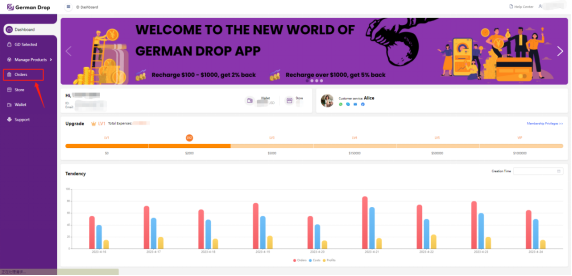
1. Select 'Orders’ on the left toolbar.
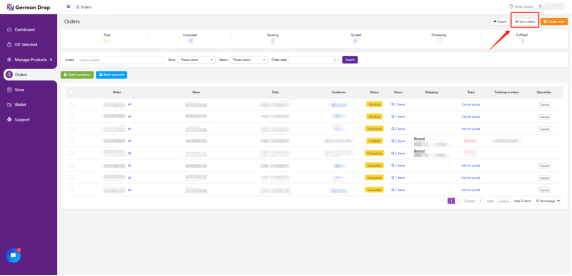
2. Within the 'Orders' section, access the 'Sync Orders' button.
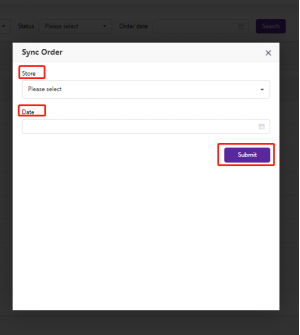
3. You will be prompted to choose your authorized store and confirm the date you wish to commence order synchronization. Once you've made your selections and submitted the request, subsequent orders can be automatically synchronized after the initial synchronization. (Please note that we support the synchronization of orders within the previous 2 months from the date you submitted your request.)
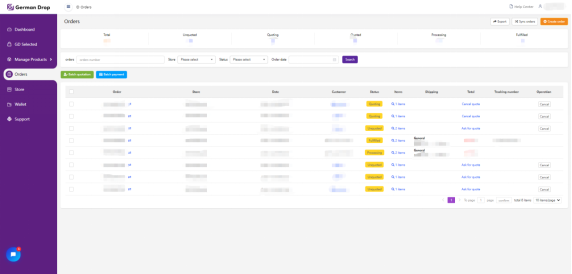
4. Following your submission. Please refresh the page, and you will see the order information updated.
This streamlined process allows you to efficiently manage your eCommerce orders while ensuring the privacy and security of your valuable order data.
